

Last updated 20 October 2026 for Vois Studio 2.6.0.
To make an AI voice laugh in Vois Studio, use the Expressive engine. It's English only and performs nine reaction tags: laugh, chuckle, gasp, sigh, groan, cough, clear throat, sniff and shush. Click where the sound should happen, type [, pick a tag and generate. Tags are sounds, not moods.
Added 20 October 2026: this is one chapter of our complete Vois Studio walkthrough. The video shows a guest laughing and sighing on cue:
Which reaction tags are there?
Expressive performs exactly these nine:
| Tag | What you hear |
|---|---|
[laugh] |
Natural laughter |
[chuckle] |
A soft, light laugh |
[gasp] |
A sharp intake of breath |
[sigh] |
An audible exhalation |
[groan] |
A frustrated or pained groan |
[cough] |
A cough |
[clear throat] |
Throat clearing |
[sniff] |
A sniff |
[shush] |
A hushing sound |
How do I add one?
- Choose Expressive. Click the engine name in the top toolbar to open Voice Settings, then under TTS Engine choose Expressive.
- Click where the sound should happen, usually just before the words it reacts to.
- Type
[and choose from the list, for example Laugh. - Generate Audio and listen.
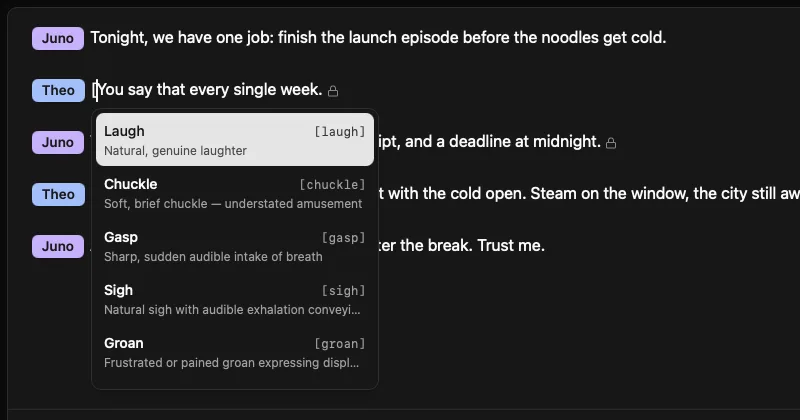
![A [laugh] tag in the script, just before the line it reacts to, with Expressive selected in the toolbar](/blog/expressive-reaction-tags-laugh-sigh/laugh-tag-in-script.webp)
In plain script text, for pasting or importing:
[Guest]: [laugh] People ask if it's a food truck. It's a food bicycle.
[Guest]: [sigh] On a good night? Eighty. On a rainy night, twelve, and one of them is mine.
Expressive comes with Subscriber and Pro.

Where should a tag go?
- Put it right before the words it reacts to: a laugh just ahead of the line that answers the joke, a sigh just ahead of the tired answer.
- One sound per spot. Vois Studio sends each tag with its own piece of text, so every tag gets words to react to. Give each tag at least a few words.
- At the end of a line, a tag joins the sentence before it. With no words after it, it's attached to the preceding sentence rather than sent on its own.
- Use them sparingly. A reaction helps when the moment would be unclear without it; a tag on every line sounds mechanical.
Why is there no [happy] tag?
Because reaction tags are vocal sounds, not acting emotions. Expressive doesn't perform [happy], [sad], [excited], [nervous], [whisper] or [dramatic]. Put the feeling in the words instead:
| Instead of | Write |
|---|---|
| [excited] Welcome back everyone! | Welcome back, everyone! You're going to love this one. |
| [nervous] I'm a little nervous actually. | Okay, confession: I've never done a podcast before. |

What happens on other engines?
Fast and Multilingual don't perform reaction tags, and they don't read the brackets aloud either:
| Engine | What happens to [laugh] |
|---|---|
| Expressive | Performed as a laugh |
| Fast, Multilingual | Removed before speaking; nothing is heard |
The tag stays in your script either way, so switching back to Expressive brings the sound back on the next generation. If you move an English Expressive scene to another engine, the laughs and sighs won't come with it: write the reaction into the words ("Ha, okay, that's a hot take").
Update, 20 October 2026: what about the newer engines?
Vois Studio 2.5.0 (11 October 2026) added Sonic and Craft and moved Omni to plain-word direction. Here's how they treat reaction tags:
| Engine | What happens to [laugh] |
|---|---|
| Sonic | Removed before speaking; nothing is heard |
| Craft, Omni | Removed and not acted; steer them with a direction instead |
Plans as of 20 October 2026: Expressive comes with Subscriber and Pro, and on Free you can try it (generate and listen); exporting its audio uses purchased export credits.
Tags or plain-word direction?
They solve different problems:
| Reaction tags | Plain-word direction | |
|---|---|---|
| Engine | Expressive | Craft and Omni |
| What it does | A specific sound at a specific spot | The tone, pace, emotion and energy of a passage |
| Languages | English | Craft 10, Omni 30 |
| Example | [sigh] On a good night? Eighty. |

quiet, close to the microphone, like sharing a secret |
| Can't do | Moods such as happy or sad | Place a sound at an exact word |
Use a tag when you need the sound itself. Use a direction when you need the whole line to feel different. How directions work: Direct an AI voice in plain words.
Related
- The complete Vois Studio 2.6 guide
- Direct an AI voice in plain words: Craft and Omni
- Which Vois Studio voice engine should I use?
- How to make an AI voice sing from text
- How to write a script for AI voices
Put one [sigh] before the most tired line in your script and play the scene back.
The Vois Team