

Last updated 20 October 2026 for Vois Studio 2.6.0.
To make an AI voice sing in Vois Studio, use the Omni engine. Write the lyric as a script line, then add a plain-word direction such as "Sing this lyric as a slow, gentle folk song, with soft acoustic guitar playing behind the voice." In our test, Omni sang it with matching backing music. Takes vary.
This is one chapter of our complete Vois Studio walkthrough. Watch it here, starting at the song:
What do you need?
| Requirement | Detail |
|---|---|
| Engine | Omni. It's a Pro engine; on Free you can try it and export its audio with purchased credits |
| Voice | Any voice Omni can use: library, cloned or designed. We designed one for the song |
| Languages | Omni speaks 30 languages. Our test was in English |
| Not this engine | Craft follows directions but doesn't sing |
How do I make Omni sing, step by step?
- Choose Omni. Click the engine name in the top toolbar, then under TTS Engine choose Omni.
- Pick or design a singer. We used Voice Design: Voices > Add voice > Design Voice, and in Describe the voice we wrote "a woman in her thirties with a soft, warm, slightly husky voice, relaxed and gentle, like a folk singer at a small cafe." Generate Preview, listen, then Save Voice.
- Add a Singer speaker. In the script, type
/, choose Speaker, name it Singer, and assign the voice in the Speakers pane. - Write the lyric as the line. Ours: "Night shift noodles, steam on the window, one more bowl before the city sleeps."
- Add the instruction. At the start of the line, type
[and write: Sing this lyric as a slow, gentle folk song, with soft acoustic guitar playing behind the voice. - Generate Audio and listen.
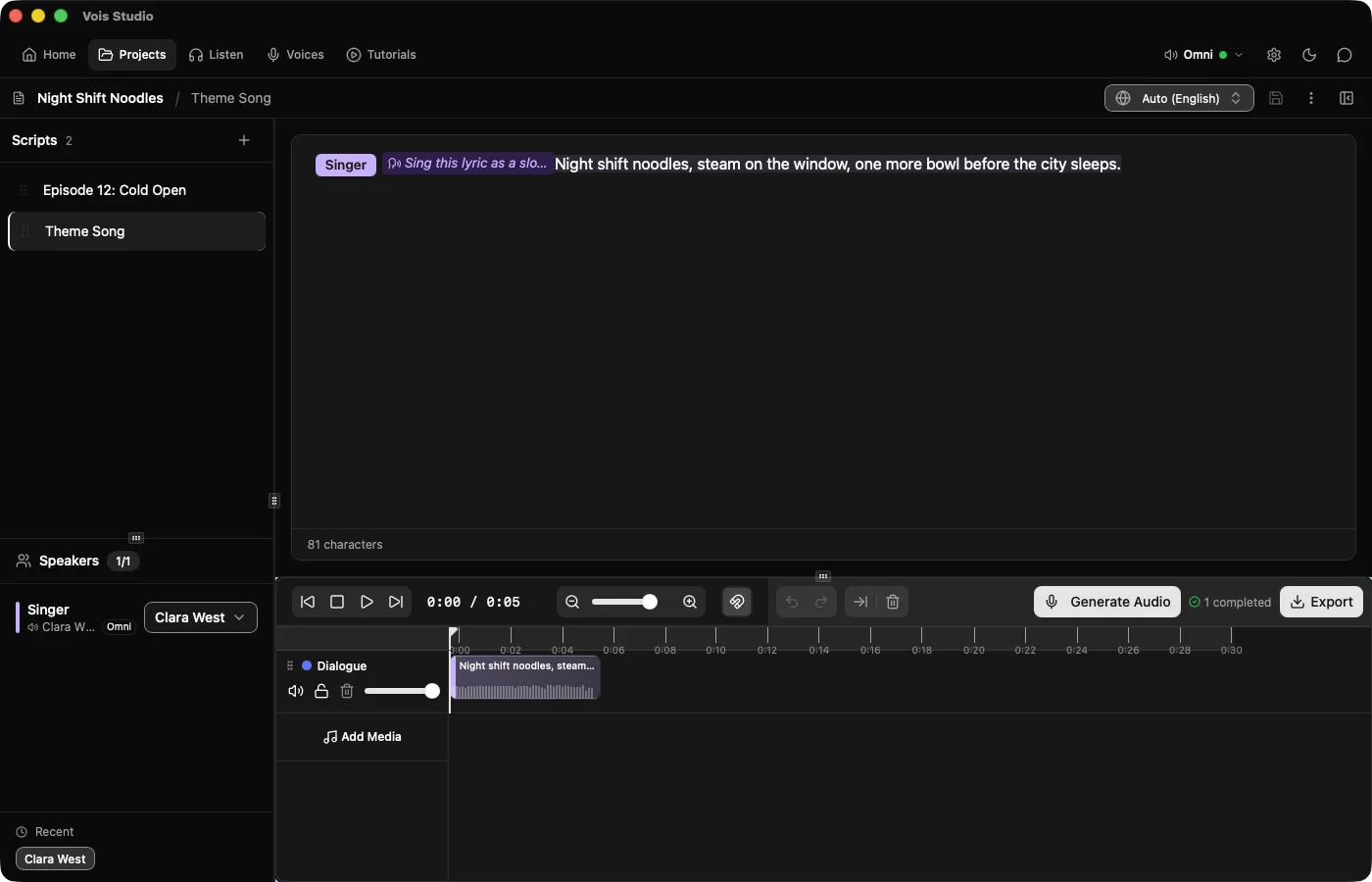
In plain script text, the same line looks like this:
[Singer]: [direction: Sing this lyric as a slow, gentle folk song, with soft acoustic guitar playing behind the voice.] Night shift noodles, steam on the window, one more bowl before the city sleeps.
What if a take speaks instead of singing?
Make the instruction plainer and generate again. Our fallback:
Sing these words as a melody, not spoken. A slow, warm folk song with soft acoustic guitar.
If that still speaks, shorten the lyric to one line and try again. Each take is a little different; that's normal.

How do I write a lyric that sings well?
- Keep it short. One or two lines works better than a paragraph.
- Give it rhythm. Similar line lengths and a natural beat help.
- Name a style and an instrument. "Slow folk song with soft acoustic guitar" gives Omni something concrete to follow.
- Say "sing". Directions about tone alone ("warm, gentle") produce speech.

How do I keep the take I like?
Generate as many takes as you want; none is lost. Right-click the clip, open Takes, and choose an earlier one. Vois Studio switches back and locks the line so Generate Audio won't replace it. To lock the current take, click the clip and press L.
What can't it do?
- There's no separate melody or music control. You describe the style in words; Omni interprets it.
- Results vary per take, and we don't promise a particular melody or arrangement.
- Craft and the other engines don't sing.
If you need full songs with verses and choruses, dedicated music generators exist; for example, ElevenLabs describes its Eleven Music product as making "full songs with vocals" (elevenlabs.io/music, checked 20 October 2026). Omni's singing is for a sung line or jingle inside a voice project, next to your narration and dialogue.
Related
- Choosing the right voice engine
- Omni Voice Design
- The complete Vois Studio 2.6 guide
- Direct an AI voice in plain words: Craft and Omni
- Make an AI voice laugh: Expressive reaction tags
Write one line you'd hum, ask Omni to sing it, and generate three takes.
The Vois Team