

Last updated 20 October 2026 for Vois Studio 2.6.0.
To direct an AI voice in Vois Studio, use Craft or Omni. On the line, type [ and a direction chip opens. Describe the delivery in plain words, such as "quiet, close to the microphone, like sharing a secret", then generate. The direction is never spoken, and it lasts until the next direction in that speaker's turn.
Added 20 October 2026: this is one chapter of our complete Vois Studio walkthrough. The video shows Craft turning a flat closing line into a secret:
What is style direction?
A style direction is a short note to the voice about how to say a line, the way you'd brief a voice actor. It steers tone, pace, emotion and energy. The words of the line stay exactly as you wrote them; the direction changes the performance.
Two engines follow directions:
- Craft directs any voice that has a recording: library voices, your clones that have a transcript, and saved designs.
- Omni directs library, cloned and designed voices, and also powers Voice Design.
The other four engines (Sonic, Fast, Expressive and Multilingual) take no direction. Expressive has reaction tags instead; see Make an AI voice laugh.
How do I add a direction?
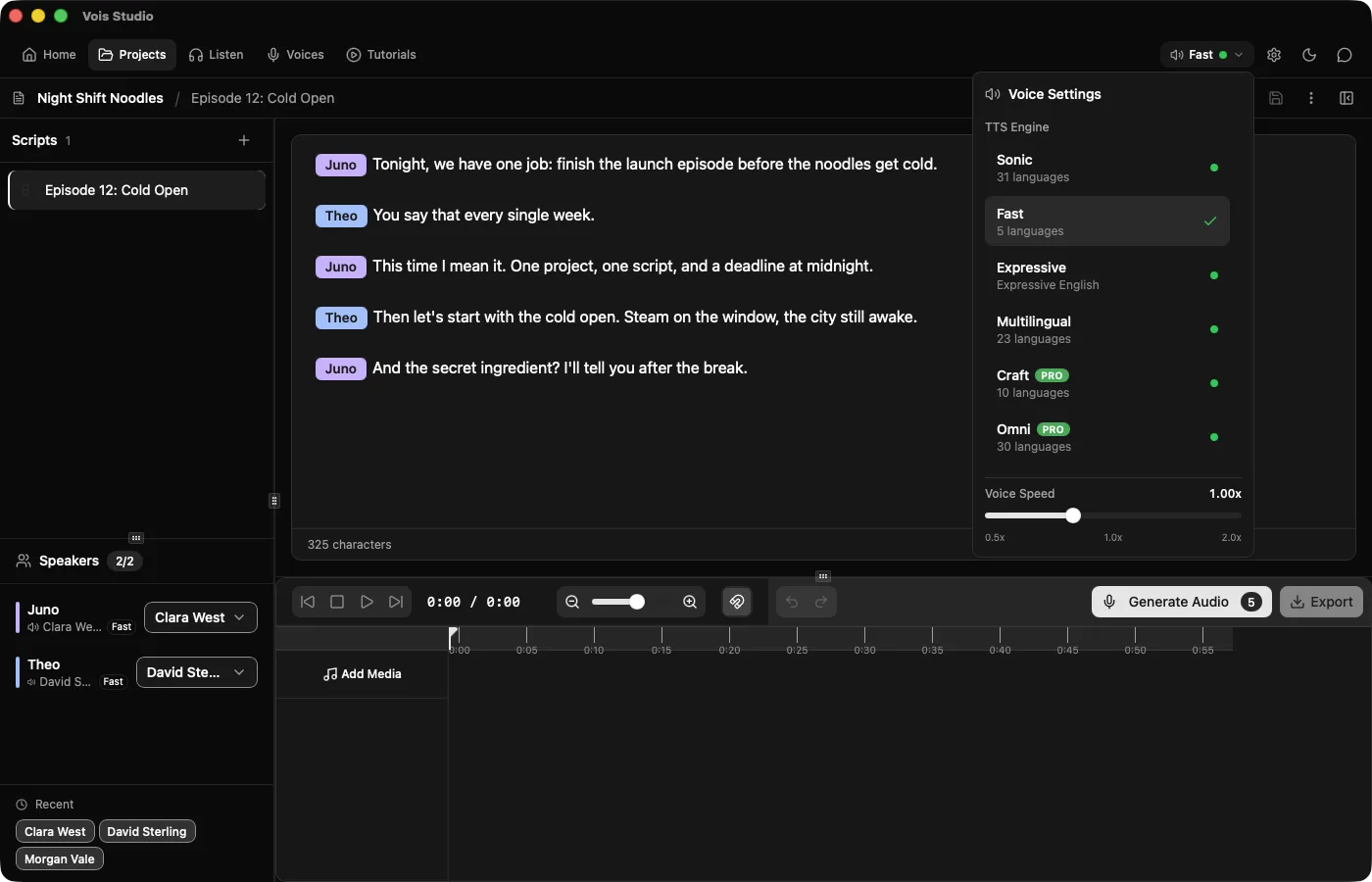
- Choose Craft or Omni. Click the engine name in the top toolbar to open Voice Settings, then choose under TTS Engine.
- Click where the delivery should start, usually the beginning of the line.
- Type
[. A direction chip opens. - Describe the delivery, for example: quiet, close to the microphone, like sharing a secret.
- Generate Audio and listen.

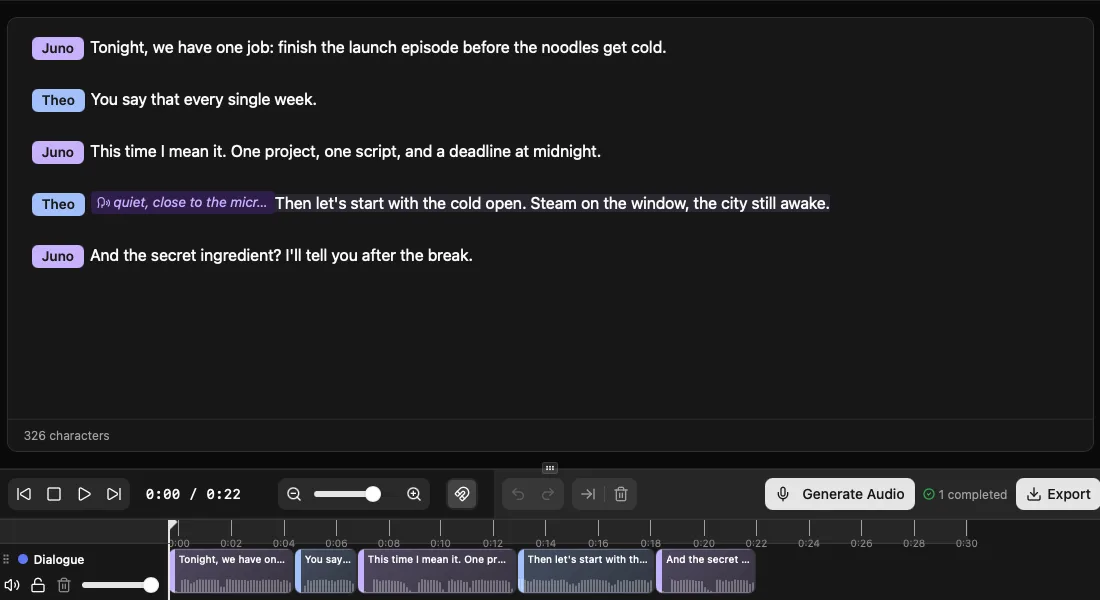
In plain script text, for pasting or importing, the same line looks like this:
[Host]: [direction: quiet, close to the microphone, like sharing a secret] The secret is the broth. Fourteen hours. Don't tell anyone.
What should a direction say?
Describe how it should sound, in the words you'd use with a person:
| Aim | Example direction |
|---|---|
| Warmer, slower | slower, warmer, a smile in the voice |
| Calm | calm and steady, unhurried |
| Emotional | holding back tears, voice trembling slightly |
| More energy | brighter and more urgent |
| Intimate | quiet, close to the microphone, like sharing a secret |
| Amused | amused, warm and relaxed, a smile in the voice |
Rules that keep directions working:
- Keep it under 2,000 characters. A sentence or two is usually enough.
- Don't put brackets or parentheses inside the direction.
- Keep delivery notes out of the spoken text. "Speak warmly:" typed into the line gets read aloud, so put it in the direction.
- Write the feeling into the words too. "Ha, okay, that's a hot take" carries amusement before any direction does.
How long does a direction last?
From its chip to the next direction in the same speaker's turn, or to the end of that turn. To change the mood halfway through a line, add a second direction where the change should happen. When the next speaker starts, their lines need their own direction.
Craft or Omni: which one?
| Craft | Omni | |
|---|---|---|
| Voices | Any voice with a recording: library, clones with a transcript, saved designs. No built-in voices | Library, cloned and designed voices |
| Languages | 10: Chinese, English, French, German, Italian, Japanese, Korean, Portuguese, Russian, Spanish | 30 |
| Direction | Plain words, same rules as Omni | Plain words |
| Also does | Speech only; doesn't sing | Voice Design: a new voice from a description |
| Plan | Pro; try it on Free | Pro; try it on Free |
Use Craft when you already have the voice you want, such as a library speaker or your own clone, and want to direct it. It needs about 9 GB of memory on a Mac and 11 GB on Windows. Vois Studio 2.5.1 made Craft voices steadier: they no longer turn warbly or unsteady partway through a line, and they sound closer to the voice you chose. Use Omni when you also need a brand-new voice from a description: Omni Voice Design. Craft doesn't sing.
On Free you can try both engines (generate and listen); exporting their audio uses purchased export credits. All six engines side by side: Which Vois Studio voice engine should I use?
How do I compare two directions?
Change the direction and generate again. The same voice performs the same words differently, so listen to each version before you settle on one, and keep the direction that works. Timeline details: The Vois Studio timeline, step by step.
Why is my direction greyed out?
The line is being spoken by an engine that doesn't take directions. Directions are offered only on lines that use Craft or Omni. On a line spoken by another engine, a direction you already added stays in your script, appears muted with a short note, and opens no editor. Switch back to Craft or Omni and it works again.
Scripts that still contain older bracketed reaction tags such as [laughter] keep them as written. Craft and Omni don't act them; add a direction to steer the delivery.
Can I use directions from the CLI?
Yes. vois-cli comes with paid plans, and --instruct passes a direction:
vois-cli tts generate --text "We made it. We actually made it." \
  --voice cloned_my_voice --engine craft --language English \
  --output /absolute/path/craft.wav --instruct "quiet disbelief turning into joy"
One --instruct covers the whole call. If two parts need different directions, split them into separate calls. Expressive ignores --instruct. More: How AI agents control your voice studio.
What can't a direction do?
- It can't place a sound. Directions describe delivery; they don't insert a cough at a word or guarantee a laugh on cue. For a laugh or sigh at an exact spot in English, use Expressive's reaction tags.
- It doesn't change a clone's accent. A cloned voice keeps the language and accent of its recording, so for another language, cast a voice recorded in that language.
- Craft doesn't sing. It directs speech only.
- It won't give the same result twice. Each generation is a little different, so listen and keep the one you like.
Related
- The complete Vois Studio 2.6 guide
- Make an AI voice laugh: Expressive reaction tags
- Which Vois Studio voice engine should I use?
- How to write a script for AI voices
Pick one flat line in your script, give it a one-sentence direction, and generate it twice.
The Vois Team